<?xml-stylesheet type="text/xsl" href="mathml.xsl"?>
<html xmlns="http://www.w3.org/1999/xhtml">
<!--        This document was created  with

            S O F T 4 S C I E N C E      S c i W r i t e r   

            http://www.soft4science.com     e-mail: info@soft4science.com
-->
  <head>
    <meta http-equiv="Content-Type" content="text/html; charset=utf-8" />
    <meta name="Generator" content="soft4science SciWriter" />
    <meta name="Style-ParagraphMargins" content="&lt;ParagraphMargins p_bottom=&quot;1&quot; p_top=&quot;1&quot; /&gt;" />
    <meta name="Style-Headings" content="&lt;Headings fontSize_H2=&quot;140&quot; /&gt;" />
    <meta name="Style-GeneralText" content="&lt;GeneralText textIndent=&quot;0&quot; /&gt;" />
    <meta name="PreferedMathMLRenderer" content="mathplayer_dl" />
    <meta name="template" content="X_Times.tpl" />
    <meta name="guid" content="76f522a1-606c-4029-a49b-0c23f9b8f2f3" />
    <meta name="date_lastUpdated" content="2008-05-14T14:26:55" />
    <meta name="date_created" content="2008-04-03T11:45:15" />
    <meta name="SciWriter-Options" content="&lt;SciWriterOptions TextWidth=&quot;969&quot; ShowRuler=&quot;True&quot; /&gt;" />
    <meta name="SciWriter-Version" content="3.0.2.0" />
    <title>unknown</title>
    <style type="text/css"><![CDATA[
    /* - CSS code generated by soft4science SciWriter  -*/

    body{font-size:14.25pt}
    table{font-size:14.25pt}
    a:link,a:active,a:visited{color:blue}
    img{border-width:0px}
    p,li,td,caption, blockquote{font-family:"Times New Roman",times}
    p{text-indent:0em}
    h1,h2,h3,h4,h5,h6{font-family:"Times New Roman",times;color:#4682B4}
    p{margin-top:1em;margin-bottom:1em}
    li{margin-top:1em;margin-bottom:1em}
    h1{font-size:160%;margin-top:1.5em;margin-bottom:1.5em}
    h2{font-size:140%;margin-top:1.5em;margin-bottom:1.5em}
    h3{font-size:140%;margin-top:1.5em;margin-bottom:1.5em}
    h4{font-size:130%;margin-top:1.5em;margin-bottom:1.5em}
    h5{font-size:120%;margin-top:1.5em;margin-bottom:1.5em}
    h6{font-size:110%;margin-top:1.5em;margin-bottom:1.5em}
    table{margin-top:1em;margin-bottom:1em}
    pre{margin-top:1em;margin-bottom:1em}
    hr{margin-top:1em;margin-bottom:1em}
    ul,ol{margin-top:0em;margin-bottom:0em}

    math          {font-family:"Times New Roman",times,CMSY10, CMEX10, Symbol}
    mml\:math    {font-family:"Times New Roman",times,CMSY10, CMEX10, Symbol}
    math[display="block"]{display:block;text-align:center;font-style: normal;}
    math *.[mathvariant="normal"] {font-weight: normal;font-style: normal;}
    math *.[mathvariant="bold"]   {font-weight: bold;font-style: normal;}
    math *.[mathvariant="italic"] {font-weight: normal;font-style: italic;}
    math *.[mathvariant="bold-italic"] {font-weight: bold;font-style: italic;}
    math *.[mathvariant="double-struck"]{font-family:msbm;font-weight: normal;font-style: normal;}
    math *.[mathvariant="script"]{font-family: eusb;font-weight: normal;font-style: normal;}
    math *.[mathvariant="bold-script"]{font-family: eusb;font-weight: bold;font-style: normal;}
    math *.[mathvariant="fraktur"] {font-family: eufm;font-weight: normal;font-style: normal;}
    math *.[mathvariant="bold-fraktur"] {font-family: eufm;font-weight: bold;font-style: italic;}
    math *.[mathvariant="sans-serif}"] {font-family: sans-serif,Arial,Lucida Sans Unicode, Verdana;font-weight: normal;font-style: normal;}
    math *.[mathvariant="bold-sans-serif"] {font-family: sans-serif,Arial, Lucida Sans Unicode, Verdana;font-weight: bold;font-style: normal;}
    math *.[mathvariant="sans-serif-italic"]{font-family: sans-serif,Arial, Lucida Sans Unicode, Verdana;font-weight: normal;font-style: italic;}
    math *.[mathvariant="sans-serif-bold-italic"] { font-family: sans-serif,Arial, Lucida Sans Unicode, Verdana ;font-weight: bold;font-style: italic;}
    math *.[mathvariant="monospace"] {font-family: monospace};
    math *.[mathsize="small"] {font-size: 80%};
    math *.[mathsize="big"] {font-size: 125%};
    msub>*:first-child[mathsize="big"],msup>*:first-child[mathsize="big"],msubsup>*:first-child[mathsize="big"],munder>*:first-child[mathsize="big"],mover>*:first-child[mathsize="big"],munderover>*:first-child[mathsize="big"],mmultiscripts>*:first-child[mathsize="big"],mroot>*:first-child[mathsize="big"] {font-size: 125%}
    msub>*:first-child[mathsize="small"],msup>*:first-child[mathsize="small"],msubsup>*:first-child[mathsize="small"],munder>*:first-child[mathsize="small"],mover>*:first-child[mathsize="small"],munderover>*:first-child[mathsize="small"],mmultiscripts>*:first-child[mathsize="small"],mroot>*:first-child[mathsize="small"] {  font-size: 80%}
    msub>*:first-child,msup>*:first-child,msubsup>*:first-child,munder>*:first-child,mover>*:first-child,munderover>*:first-child,mmultiscripts>*:first-child,mroot>*:first-child {  font-size: 100%}
    msub>*[mathsize="big"],msup>*[mathsize="big"],msubsup>*[mathsize="big"],munder>*[mathsize="big"],mover>*[mathsize="big"],munderover>*[mathsize="big"],mmultiscripts>*[mathsize="big"],math[display="inline"] mfrac>*[mathsize="big"],math *[scriptlevel="+1"][mathsize="big"] {  font-size: 89%  /* (.71 times 1.25) */}
    msub>* [mathsize="small"],msup>*[mathsize="small"],msubsup>*[mathsize="small"],munder>*[mathsize="small"],mover>*[mathsize="small"],munderover>*[mathsize="small"],mmultiscripts>*[mathsize="small"],math[display="inline"] mfrac>*[mathsize="small"],math *[scriptlevel="+1"][mathsize="small"] {  font-size: 57% /* (.71 times .80) */}
    msub>*,msup>*,msubsup>*,munder>*,mover>*,munderover>*,mmultiscripts>*,math[display="inline"] mfrac>*,math *[scriptlevel="+1"] {  font-size: 71%}
    mroot>*[mathsize="big"] {  font-size: 62%  /* (.50 times 1.25) */}
    mroot>*[mathsize="small"] {  font-size: 40% /* (.50 times .80) */}
    mroot>* {  font-size: 50%}
    .s4s-table-right{text-align:right}
    .s4s-table-right table{margin-left:auto;margin-right:0;text-align:left;}
    .s4s-table-right caption{margin-left:auto;margin-right:auto;text-align:center;}
    .s4s-table-center{text-align:center;}
    .s4s-table-center table{margin-left:auto;margin-right:auto;text-align:left;}
    .s4s-table-center caption{margin-left:auto;margin-right:auto;text-align:center;}
    .s4s-empty-paragraph{height:1em;width:textwidth}
    .s4s-noindent{text-indent:0em}
    .s4s-citation          {text-decoration:none}
    .s4s-footnote          {text-decoration:none;position:relative;top:-0.2em;font-size:0.9em}
    .s4s-section-reference {text-decoration:none}
    .s4s-theorem-reference {text-decoration:none}
    .s4s-table-reference   {text-decoration:none}
    .s4s-figure-reference  {text-decoration:none}
    .s4s-equation-reference{text-decoration:none}
    .s4s-latex             {visibility:hidden;line-height:0em;height:0em;width:0em;display:none}

    /* - CSS code generated by soft4science SciWriter  -*/
]]></style>
  </head>
  <body style="margin-left:50px;margin-right:50px;margin-top:50px;margin-bottom:50px">
    <table class="s4s-figure">
      <tbody>
        <tr>
          <td align="center">
            <img alt="log7" src="Student_Book_Matlab_files/log7.gif" />
          </td>
        </tr>
      </tbody>
    </table>
    <p style="text-align:center" class="s4s-noindent">
      <span style="font-size:200%">
        <strong>An Introduction to MATLAB</strong>
      </span>
    </p>
    <p class="s4s-empty-paragraph"> </p>
    <h1 class="s4s-section-numbered" id="SECTION.406dc983-f38c-43fc-bd33-9fee5146f8ec">
      <span class="s4s-section-number">1 </span>What is MATLAB?</h1>
    <p class="s4s-noindent">MATLAB is a mathematical software package which utilises matrix manipulation to perform complex numerical calculations. Unlike Mathematica or Maple, it is not a computer algebra system, so cannot compute symbolic mathematics unless an appropriate toolbox (e.g. the Symbolic Math Toolbox, which can be purchased from The Mathworks) is added to facilitate this. </p>
    <h1 class="s4s-section-numbered" id="SECTION.9ca6cc96-8290-418b-b8e7-4924bfc560fd">
      <span class="s4s-section-number">2 </span>Some basic commands</h1>
    <h2 class="s4s-section-numbered" id="SECTION.45c9c375-5515-4d65-8a3d-239d3e017eb4">
      <span class="s4s-section-number">2.1 </span>The <span style="font-family:Tahoma">'demos'</span> command</h2>
    <p class="s4s-noindent">MATLAB includes an extensive help window, which can be activated by typing </p>
    <p>
      <span style="font-family:Tahoma">demos</span>
    </p>
    <p>in the command window followed by pressing the
<math xmlns="http://www.w3.org/1998/Math/MathML"><mo>[</mo><mspace width="mediummathspace" height="0.2em" /><mspace width="mediummathspace" height="0.2em" /><mi>key</mi><mspace width="mediummathspace" height="0.2em" /></math>. After a short wait, the help window appears. This includes 'Contents', 'Index', 'Search', 'Demos' and 'Favorite' tabs. Problems can often be solved quickly through browsing this facility. Once the name of any required command is known, it is possible to get immediate help information for this command by entering<span style="font-family:Tahoma"> help</span> followed by the command name, e.g.</p>
    <p>
      <span style="font-family:Tahoma">help sin</span>
    </p>
    <p>
      <span style="font-family:Tahoma">SIN Sine.</span>
    </p>
    <p>
      <span style="font-family:Tahoma">SIN(X) is the sine of the elements of X.</span>
    </p>
    <p>MATLAB always prints commands in UPPER case, even though they are inputted in lower case. This is because the command window would recognise and attempt to execute each command that appeared in the help output. This example has also highlighted the fact that MATLAB carries out its calculations on vectors <span style="font-family:Tahoma">('elements of X'</span>). </p>
    <h2 class="s4s-section-numbered" id="SECTION.d58f17c3-393d-4fcb-9ffa-23311f58d648">
      <span class="s4s-section-number">2.2 </span>Assigning values </h2>
    <p class="s4s-noindent">MATLAB is a numerical computation package. It requires numbers with which to carry out computations. A
s a result, expressions such as <math xmlns="http://www.w3.org/1998/Math/MathML"><mi>y</mi><mo>=</mo><mn>2</mn><mi>x</mi></math> are meaningless to MATLAB 
unless it knows what <math xmlns="http://www.w3.org/1998/Math/MathML"><mi>x</mi></math> actually represents. </p>
    <p>Upon opening MATLAB, we are faced with a command window. If we enter </p>
    <p>
      <span style="font-family:Tahoma">y=2*x</span>
    </p>
    <p>followed by the <math xmlns="http://www.w3.org/1998/Math/MathML"><mo>[</mo></math> key the error message </p>
    <p>
      <span style="color:Red;font-family:Tahoma">??? Undefined function or variable 'x'.</span>
    </p>
    <p>is returned. To carry out a computation such as <math xmlns="http://www.w3.org/1998/Math/MathML"><mi>y</mi><mo>=</mo><mn>2</mn><mi>x</mi><mo>,</mo><mspace width="mediummathspace" height="0.2em" /></math>we first, 
therefore, need to decide a value for <span style="font-family:Tahoma">x</span> and type this into the command window</p>
    <p>
      <span style="font-family:Tahoma">x=2</span>
    </p>
    <p>followed by the <math xmlns="http://www.w3.org/1998/Math/MathML"><mo>[</mo><mspace width="mediummathspace" height="0.2em" /><mi>key</mi><mn>.</mn>
<mspace width="mediummathspace" height="0.2em" /></math>The screen confirms that <span style="font-family:Tahoma">x </span>has been assigned the value 
<span style="font-family:Tahoma">2</span>.</p>
    <p>Then, enter </p>
    <p>
      <span style="font-family:Tahoma">y=2*x</span>
    </p>
    <p>MATLAB confirms that <span style="font-family:Tahoma">y</span> has been assigned the value <span style="font-family:Tahoma">4</span>. </p>
    <p>If we re-enter a new value for <span style="font-family:Tahoma">x </span>, say </p>
    <p>
      <span style="font-family:Tahoma">x=3</span>
    </p>
    <p>MATLAB displays the new value. If we enter </p>
    <p>
      <span style="font-family:Tahoma">y</span>
    </p>
    <p>into the command window, it shows that <span style="font-family:Tahoma">y= 4</span>.</p>
    <p>Re-entering</p>
    <p>
      <span style="font-family:Tahoma">y=2*x</span>
    </p>
    <p>gives the new value for <span style="font-family:Tahoma">y</span>. Clearly, MATLAB does not carry out the computation until it has been re-entered in the command window.</p>
    <p>To calculate powers of a number, MATLAB uses the "<span style="font-family:Tahoma">^</span>" sign.
 To calculate <math xmlns="http://www.w3.org/1998/Math/MathML"><mi>y</mi><mo>=</mo><msup><mi>x</mi><mrow><mn>3</mn></mrow></msup>
<mspace width="mediummathspace" height="0.2em" /></math>we enter</p>
    <p>
      <span style="font-family:Tahoma">y=x^3</span>
    </p>
    <p>This gives the result <span style="font-family:Tahoma">y=27 </span>, since the last value entered for <span style="font-family:Tahoma">x </span>was 3. </p>
    <p>To calculate roots of a number, use the fact that <math xmlns="http://www.w3.org/1998/Math/MathML"><mroot><mrow><mi>a</mi></mrow><mrow>
<mi mathsize="125%">n</mi></mrow></mroot><mspace width="mediummathspace" height="0.2em" /></math>can also be written as 
<math xmlns="http://www.w3.org/1998/Math/MathML"><msup><mrow><mi>a</mi></mrow><mrow><mstyle mathsize="125%"><mfrac><mrow><mn>1</mn></mrow><mrow><mi>n</mi>
</mrow></mfrac></mstyle></mrow></msup></math>. </p>
    <p>Enter </p>
    <p>
      <span style="font-family:Tahoma">a=27</span>
    </p>
    <p>Now enter</p>
    <p>
      <span style="font-family:Tahoma">y=a^1/3</span>
    </p>
    <p>The answer given is <span style="font-family:Tahoma">y = 9 </span>. This is (hopefully!) not the answer we wanted. 
MATLAB has interpreted <span style="font-family:Tahoma">y=a^1/3 </span>as <math xmlns="http://www.w3.org/1998/Math/MathML"><mi>y</mi><mo>=</mo><mstyle mathsize="125%">
<mfrac><mrow><msup><mi>a</mi><mrow><mn>1</mn></mrow></msup></mrow><mrow><mn>3</mn></mrow></mfrac></mstyle></math></p>
    <p>To give the correct answer, the fraction needs to be entered in brackets:</p>
    <p>
      <span style="font-family:Tahoma">y=a^(1/3)</span>
    </p>
    <p>This gives the answer <span style="font-family:Tahoma">3 </span>as expected.</p>
    <p>The transcendental number <math xmlns="http://www.w3.org/1998/Math/MathML"><mi>&#x003C0;</mi><mspace width="mediummathspace" height="0.2em" /></math>
is represented by <span style="font-family:Tahoma">pi </span>. Entering </p>
    <p>
      <span style="font-family:Tahoma">pi</span>
    </p>
    <p>into the command window gives an output </p>
    <p>
      <span style="font-family:Tahoma">pi=3.1416</span>. MATLAB has associated <span style="font-family:Tahoma">pi </span>with a number and rounded this to 4 decimal places.</p>
    <p>Entering </p>
    <p>
      <span style="font-family:Tahoma">format long</span>
    </p>
    <p>
      <span style="font-family:Tahoma">pi</span>
    </p>
    <p>returns the output <span style="font-family:Tahoma">3.14159265358979 </span>i.e. to 14 decimal places. Entering </p>
    <p>
      <span style="font-family:Tahoma">format short</span>
    </p>
    <p>returns us to the default setting of 4 decimal places.</p>
    <p>Conversely, if we enter </p>
    <p>
      <span style="font-family:Tahoma">e</span>
    </p>
    <p>the response given by MATLAB is </p>
    <p>
      <span style="color:Red;font-family:Tahoma">??? Undefined function or variable 'e'.</span>
    </p>
    <p>This is because the exponential is only defined by the <strong>function </strong><span style="font-family:Tahoma">'exp'. </span>We can therefore assign a value for <span style="font-family:Tahoma">e </span>by entering</p>
    <p>
      <span style="font-family:Tahoma">e=exp(1)</span>
    </p>
    <p>which is the equivalent of <math xmlns="http://www.w3.org/1998/Math/MathML"><msup><mrow><mi>e</mi></mrow><mrow><mn>1</mn></mrow></msup><mspace width="mediummathspace" height="0.2em" /></math>. The response confirms this:</p>
    <p>
      <span style="font-family:Tahoma">e =2.7183</span>
    </p>
    <h2 class="s4s-section-numbered" id="SECTION.a44a087d-4cbc-4c2b-8cf3-8f75ad660e43">
      <span class="s4s-section-number">2.3 </span>Entering matrices</h2>
    <p class="s4s-noindent">To produce a <math xmlns="http://www.w3.org/1998/Math/MathML"><mn>3</mn><mo>x</mo><mn>3</mn></math> matrix to look like this</p>
    <p>
      <math xmlns="http://www.w3.org/1998/Math/MathML">
        <mi>A</mi>
        <mo>=</mo>
        <mrow>
          <mo>(</mo>
          <mtable displaystyle="false">
            <mtr>
              <mtd>
                <mn>1</mn>
              </mtd>
              <mtd>
                <mn>2</mn>
              </mtd>
              <mtd>
                <mn>3</mn>
              </mtd>
            </mtr>
            <mtr>
              <mtd>
                <mn>4</mn>
              </mtd>
              <mtd>
                <mn>5</mn>
              </mtd>
              <mtd>
                <mn>6</mn>
              </mtd>
            </mtr>
            <mtr>
              <mtd>
                <mn>7</mn>
              </mtd>
              <mtd>
                <mn>8</mn>
              </mtd>
              <mtd>
                <mn>9</mn>
              </mtd>
            </mtr>
          </mtable>
          <mo>)</mo>
        </mrow>
        <mspace width="mediummathspace" height="0.2em" />
      </math>, </p>
    <p>in the command line window, type</p>
    <p>
      <span style="font-family:Tahoma">A=[ 1 2 3 ; 4 5 6 ; 7 8 9 ]</span>
    </p>
    <p>separating each entry by a space, then press the <math xmlns="http://www.w3.org/1998/Math/MathML"><mo>[</mo><mspace width="mediummathspace" height="0.2em" /></math>key. 
Each semi-colon "<span style="font-family:Tahoma">;</span>" tells MATLAB that the next entry is to be placed on a new line within the brackets. 
If the commands have been entered correctly, MATLAB will display the desired matrix on the screen. Note that MATLAB is case sensitive! 
<span style="font-family:Tahoma">A</span> is NOT the same as <span style="font-family:Tahoma">a</span>.</p>
    <p>If a mistake has been made, MATLAB will display a red error message. For example, if we enter</p>
    <p>
      <span style="font-family:Tahoma">A=[ 1 2 3 ; 4 5 6 7 8 9 ]</span>
    </p>
    <p>MATLAB will output </p>
    <p>
      <span style="color:Red;font-family:Tahoma">??? Error using ==&gt; vertcat</span>
    </p>
    <p>
      <span style="color:Red;font-family:Tahoma">CAT arguments dimensions are not consistent.</span>
    </p>
    <p>It may not be obvious from the error message what error has been made. However, upon inspection of the original command, it is easy to see that a "<span style="font-family:Tahoma">;</span>" has been omitted between the <span style="font-family:Tahoma">6 </span>and the <span style="font-family:Tahoma">7.</span> The error message is pointing out that the original command is attempting to construct a matrix with 3 entries in the first row and 6 entries in the second. </p>
    <p>If an error is made, rather than re-typing the whole command, it is much easier to press the <strong>up arrow</strong> 
<math xmlns="http://www.w3.org/1998/Math/MathML"><mrow><mo>(</mo><mo>&#x02191;</mo><mo>)</mo><mspace width="mediummathspace" height="0.2em" /></mrow></math> 
cursor key to retrieve the original command then simply add the semi-colon in the correct position. 
Note that it is not necessary to move the cursor to the end of the command before pressing the <math xmlns="http://www.w3.org/1998/Math/MathML"><mo>[</mo>
<mspace width="mediummathspace" height="0.2em" /></math>key</p>
    <p>If it is not required to print the output on screen, add a further semi-colon at the end of any command thus</p>
    <p>
      <span style="font-family:Tahoma">A=[ 1 2 3 ; 4 5 6 ; 7 8 9 ] ;</span>
    </p>
    <p>This is particularly desirable when the output is large. </p>
    <p>By clicking on the <strong>Workspace </strong>tab in the window to the left of the command window, it is possible to view all of the objects that have been created in the MATLAB 
session so far. If <span style="font-family:Tahoma">A </span>has been entered correctly, the window will show <span style="font-family:Tahoma">A </span>in the name column and 
<span style="font-family:Tahoma">[ 1 2 3 ; 4 5 6 ; 7 8 9 ] </span>in the value column.</p>
    <p>If a new matrix </p>
    <p>
      <span style="font-family:Tahoma">B=[ 1 2 3 4 ; 5 6 7 8 ; 9 10 11 12 ; 13 14 15 16 ] ;</span>
    </p>
    <p>is entered and the Workspace window is checked, <span style="font-family:Tahoma">B </span> is listed 
as<span style="font-family:Tahoma"> &lt; 4x4 double &#x0003E; </span> which is the standard form for all matrices larger than 
<math xmlns="http://www.w3.org/1998/Math/MathML"><mn>3</mn><mo>x</mo><mn>3</mn></math> in size.</p>
    <p>The Workspace window is a powerful tool when looking for the source of errors. One of the most common errors occurs 
when an attempt is made to multiply two matrices with incompatible inner dimensions. It is a relatively simple matter to check the dimensions using the Workspace window.</p>
    <h2 class="s4s-section-numbered" id="SECTION.d13a31c6-ce4b-4a2d-abe5-17b77c7b27f4">
      <span class="s4s-section-number">2.4 </span>Arithmetic operations on matrices</h2>
    <p class="s4s-noindent">Addition and subtraction of matrices is carried out using the standard + and - operators:</p>
    <p>
      <span style="font-family:Tahoma">A+A</span>
    </p>
    <p>
      <math xmlns="http://www.w3.org/1998/Math/MathML">
        <mtable displaystyle="false">
          <mtr>
            <mtd>
              <mn>2</mn>
            </mtd>
            <mtd>
              <mn>4</mn>
            </mtd>
            <mtd>
              <mn>6</mn>
            </mtd>
          </mtr>
          <mtr>
            <mtd>
              <mn>8</mn>
            </mtd>
            <mtd>
              <mn>10</mn>
            </mtd>
            <mtd>
              <mn>12</mn>
            </mtd>
          </mtr>
          <mtr>
            <mtd>
              <mn>14</mn>
            </mtd>
            <mtd>
              <mn>16</mn>
            </mtd>
            <mtd>
              <mn>18</mn>
            </mtd>
          </mtr>
        </mtable>
      </math>
    </p>
    <p>
      <span style="font-family:Tahoma">A-A</span>
    </p>
    <p>
      <math xmlns="http://www.w3.org/1998/Math/MathML">
        <mtable displaystyle="false">
          <mtr>
            <mtd>
              <mn>0</mn>
            </mtd>
            <mtd>
              <mn>0</mn>
            </mtd>
            <mtd>
              <mn>0</mn>
            </mtd>
          </mtr>
          <mtr>
            <mtd>
              <mn>0</mn>
            </mtd>
            <mtd>
              <mn>0</mn>
            </mtd>
            <mtd>
              <mn>0</mn>
            </mtd>
          </mtr>
          <mtr>
            <mtd>
              <mn>0</mn>
            </mtd>
            <mtd>
              <mn>0</mn>
            </mtd>
            <mtd>
              <mn>0</mn>
            </mtd>
          </mtr>
        </mtable>
      </math>
    </p>
    <p>Notice that although you are required to enter matrices using square brackets, MATLAB  output does NOT include them! </p>
    <h2 class="s4s-section-numbered" id="SECTION.4cfc931a-5f1c-49bd-8532-eeda209bf227">
      <span class="s4s-section-number">2.5 </span>Representation of polynomials</h2>
    <p class="s4s-noindent">Whereas a computer algebra system represents a polynomial such as 
<math xmlns="http://www.w3.org/1998/Math/MathML"><msup><mrow><mi>x</mi></mrow><mrow><mn>2</mn></mrow></msup><mo>-</mo><mn>3</mn><mi>x</mi><mo>+</mo>
<mn>2</mn></math> explicitly, MATLAB uses a vector of coefficients to represent a polynomial. In this case the vector is 
<math xmlns="http://www.w3.org/1998/Math/MathML"><mo stretchy="false">(</mo><mn>1</mn><mspace width="mediummathspace" height="0.2em" /><mo>-</mo><mn>3</mn>
<mspace width="mediummathspace" height="0.2em" /><mspace width="mediummathspace" height="0.2em" /><mn>2</mn><mo stretchy="false">)</mo></math> . 
To find the roots of a polynomial in MATLAB, the function <span style="font-family:Tahoma">'roots' </span>is used:</p>
    <p>
      <span style="font-family:Tahoma">p=[1 -3 2];</span>
    </p>
    <p>
      <span style="font-family:Tahoma">roots(p)</span>
    </p>
    <p>
      <span style="font-family:Tahoma">ans =</span>
    </p>
    <p>
      <span style="font-family:Tahoma">2</span>
    </p>
    <p>
      <span style="font-family:Tahoma">1</span>
    </p>
    <p>The roots can also be found by entering the polynomial vector directly into the roots function:</p>
    <p>
      <span style="font-family:Tahoma">roots([1 -3 2])</span>
    </p>
    <p>
      <span style="font-family:Tahoma">ans =</span>
    </p>
    <p>
      <span style="font-family:Tahoma">2</span>
    </p>
    <p>
      <span style="font-family:Tahoma">1</span>
    </p>
    <p>Note that omission of square brackets within the roots function results in the following error message:</p>
    <p>
      <span style="font-family:Tahoma">roots(1 -3 2)</span>
    </p>
    <p>
      <span style="color:Red;font-family:Tahoma">??? roots(1 -3 2)</span>
    </p>
    <p>
      <span style="color:Red;font-family:Tahoma">Error: ")" expected, "numeric value" found.</span>
    </p>
    <p>It is also possible to find the coefficients of a polynomial given the roots, using the <span style="font-family:Tahoma">'poly'</span> function:</p>
    <p>
      <span style="font-family:Tahoma">poly([-2 2])</span>
    </p>
    <p>
      <span style="font-family:Tahoma">ans = 1 0 -4</span>
    </p>
    <p>Note that the second entry of the vector is zero, indicating that the required polynomial with roots -2 and 2 is 
<math xmlns="http://www.w3.org/1998/Math/MathML"><msup><mrow><mi>x</mi></mrow><mrow><mn>2</mn></mrow></msup><mo>-</mo><mn>4</mn></math> .</p>
    <h2 class="s4s-section-numbered" id="SECTION.b725655e-db7d-4e57-8f47-78d905a86331">
      <span class="s4s-section-number">2.6 </span>Plotting graphs</h2>
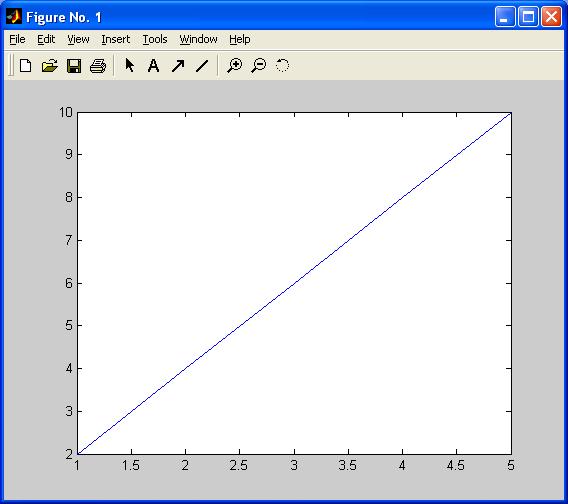
    <p class="s4s-noindent">MATLAB plots graphs using vectors of coordinates. A simple illustration is given by creating 2 vectors each with
 5 entries and assign them to the letters<span style="font-family:Tahoma"> 'x' </span>and <span style="font-family:Tahoma">'y' </span>, then plotting 
<span style="font-family:Tahoma">x</span> versus <span style="font-family:Tahoma">y</span>:</p>
    <p>
      <span style="font-family:Tahoma">x=[1 2 3 4 5];</span>
    </p>
    <p>
      <span style="font-family:Tahoma">y=[2 4 6 8 10];</span>
    </p>
    <p>
      <span style="font-family:Tahoma">plot(x,y)</span>
    </p>
    <p>We see a graph like this:</p>
    <div class="s4s-table-center">
      <table class="s4s-figure">
        <tbody>
          <tr>
            <td align="center">
              <img alt="MATLAB1" src="Student_Book_Matlab_files/MATLAB1.jpg" />
            </td>
          </tr>
        </tbody>
      </table>
    </div>
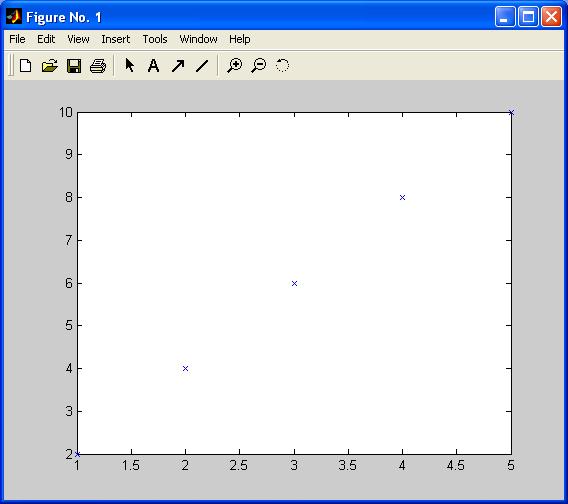
    <p class="s4s-noindent">The range along the x-axis is the same as that of the <span style="font-family:Tahoma">x</span> vector. Similarly, the range along the y-axis matches that of the <span style="font-family:Tahoma">y </span>vector. By default, MATLAB has joined each of the points with a blue line. If we want to see only the points that have been indicated by the co-ordinates, the <span style="font-family:Tahoma">plot </span>function needs to be modified slightly:</p>
    <p>
      <span style="font-family:Tahoma">plot(x,y,'x')</span>
    </p>
    <p>What now appears is this:</p>
    <div class="s4s-table-center">
      <table class="s4s-figure">
        <tbody>
          <tr>
            <td align="center">
              <img alt="MATLAB2" src="Student_Book_Matlab_files/MATLAB2.jpg" />
            </td>
          </tr>
        </tbody>
      </table>
    </div>
    <p class="s4s-noindent">Each of the co-ordinates (1, 2), (2, 4), (3, 6), (4, 8), (5, 10) has been plotted with a blue 'x'. Blue is the default colour for plotting. 
You will notice that the line describes the function <math xmlns="http://www.w3.org/1998/Math/MathML"><mi>y</mi><mo>=</mo><mn>2</mn><mi>x</mi></math> for 
<math xmlns="http://www.w3.org/1998/Math/MathML"><mn>1</mn><mo>&#x02264;</mo><mi>x</mi><mo>&#x02264;</mo><mn>5</mn></math> . </p>
    <p>An alternative way of producing the same graph is to input</p>
    <p>
      <span style="font-family:Tahoma">x=[1 2 3 4 5];</span>
    </p>
    <p>
      <span style="font-family:Tahoma">y=2*x;</span>
    </p>
    <p>
      <span style="font-family:Tahoma">plot(x,y,'x')</span>
    </p>
    <p>This example shows how we need to approach graphing functions of one variable in MATLAB. First produce a vector of values for the input variable, 
then calculate the output values using either a user designed function (e.g. multiply by 2) or an inbuilt MATLAB function 
(e.g.<span style="font-family:Tahoma"> 'sin' </span>, <span style="font-family:Tahoma">'exp'</span>) and assign these to a suitable name
 (e.g. <span style="font-family:Tahoma">'y', 'output'</span>, etc). Finally, use the <span style="font-family:Tahoma">'plot' </span>command to produce the graph. 
For example, plot <math xmlns="http://www.w3.org/1998/Math/MathML"><mi>y</mi><mo>=</mo><mi>sin</mi><mo stretchy="false">(</mo><mi>x</mi><mo stretchy="false">)</mo><mo>,</mo>
<mspace width="mediummathspace" height="0.2em" /><mo>-</mo><mn>2</mn><mi>&#x003C0;</mi><mo>&#x02264;</mo><mi>x</mi><mo>&#x02264;</mo><mn>2</mn><mi>&#x003C0;</mi>
<mspace width="mediummathspace" height="0.2em" /></math>. </p>
    <p>
      <span style="font-family:Tahoma">x=[-2*pi -pi 0 pi 2*pi];</span>
    </p>
    <p>
      <span style="font-family:Tahoma">y=sin(x);</span>
    </p>
    <p>
      <span style="font-family:Tahoma">plot(x,y)</span>
    </p>
    <div class="s4s-table-center">
      <table class="s4s-figure">
        <tbody>
          <tr>
            <td align="center">
              <img alt="MATLAB3" src="Student_Book_Matlab_files/MATLAB3.jpg" />
            </td>
          </tr>
        </tbody>
      </table>
    </div>
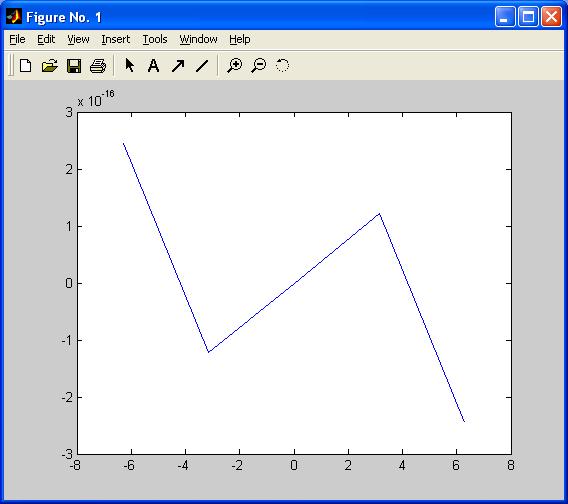
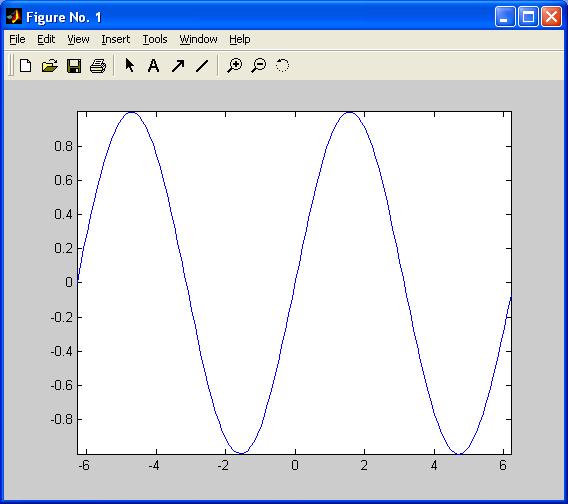
    <p class="s4s-noindent">This is not what we wanted! 5 points is clearly not enough, so we cannot reproduce a sine wave. Also, at each of the points, we know that 
<math xmlns="http://www.w3.org/1998/Math/MathML"><mi>sin</mi><mo stretchy="false">(</mo><mi>x</mi><mo stretchy="false">)</mo>
<mspace width="mediummathspace" height="0.2em" /><mspace width="mediummathspace" height="0.2em" /></math> takes the value 0, although MATLAB, 
working to finite precision, produces outputs around <math xmlns="http://www.w3.org/1998/Math/MathML"><msup><mrow><mo>&#x000B1;</mo><mn>10</mn></mrow><mrow><mo>-</mo>
<mn>16</mn></mrow></msup><mspace width="mediummathspace" height="0.2em" /><mn>.</mn><mspace width="mediummathspace" height="0.2em" /></math>
To produce something that looks like a sine wave, we need extra points. Here are two ways of producing a suitable 
<math xmlns="http://www.w3.org/1998/Math/MathML"><mi>x</mi></math> vector. </p>
    <p>
      <span style="font-family:Tahoma">x=-2*pi:0.1:2*pi;</span>
    </p>
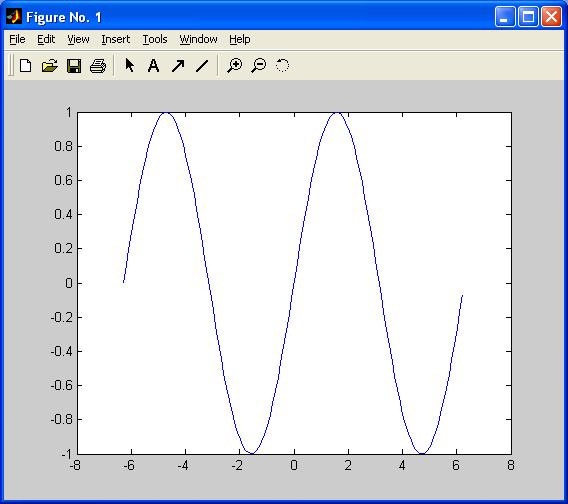
    <p>produces a vector with first element equal to -2*pi, then each successive element 0.1 greater than the previous element, finishing with a final element less than 
<math xmlns="http://www.w3.org/1998/Math/MathML"><mn>2</mn><mi>&#x003C0;</mi></math> . This particular vector has 126 elements. Now apply the sine function and graph the result:</p>
    <p>
      <span style="font-family:Tahoma">y=sin(x);</span>
    </p>
    <p>
      <span style="font-family:Tahoma">plot(x,y);</span>
    </p>
    <div class="s4s-table-center">
      <table class="s4s-figure">
        <tbody>
          <tr>
            <td align="center">
              <img alt="MATLAB4" src="Student_Book_Matlab_files/MATLAB4.jpg" />
            </td>
          </tr>
        </tbody>
      </table>
    </div>
    <p class="s4s-noindent">Note that MATLAB extends the plot window to either side of the range of our graph, to the nearest even integer values, -8 and 8. To prevent this, input</p>
    <p>
      <span style="font-family:Tahoma">axis tight</span>
    </p>
    <p>to produce</p>
    <div class="s4s-table-center">
      <table class="s4s-figure">
        <tbody>
          <tr>
            <td align="center">
              <img alt="MATLAB5" src="Student_Book_Matlab_files/MATLAB5.jpg" />
            </td>
          </tr>
        </tbody>
      </table>
    </div>
    <p class="s4s-noindent">The graph now fits exactly to the plot window. If, instead of using increments of 0.1 in the <math xmlns="http://www.w3.org/1998/Math/MathML"><mi>x</mi>
<mspace width="mediummathspace" height="0.2em" /></math>-vector we want to create a vector with a desired number of equally spaced elements, the command 
<span style="font-family:Tahoma">'linspace' </span>can be used:</p>
    <p>
      <span style="font-family:Tahoma">x=linspace(-2*pi,2*pi,500);</span>
    </p>
    <p>produces a vector with 500 elements, first element <math xmlns="http://www.w3.org/1998/Math/MathML"><mo>=</mo><mo>-</mo><mn>2</mn><mi>&#x003C0;</mi></math>, 
final element <math xmlns="http://www.w3.org/1998/Math/MathML"><mo>=</mo><mn>2</mn><mi>&#x003C0;</mi></math>, with an intermediate 498 equally spaced elements. 
Then enter</p>
    <p>
      <span style="font-family:Tahoma">y=sin(x);</span>
    </p>
    <p>
      <span style="font-family:Tahoma">plot(x,y)</span>
    </p>
    <p>to produce another sine wave, visually similar to the first one we produced, only this time using 500 points instead of 126. </p>
    <p class="s4s-empty-paragraph"> </p>
    <p class="s4s-empty-paragraph"> </p>
    <p class="s4s-empty-paragraph" />
  </body>
</html>